Distracted Walking Prevention: How Video Behavior Analytics (VBA) Stops the Smartphone Zombie Problem

See It In Action
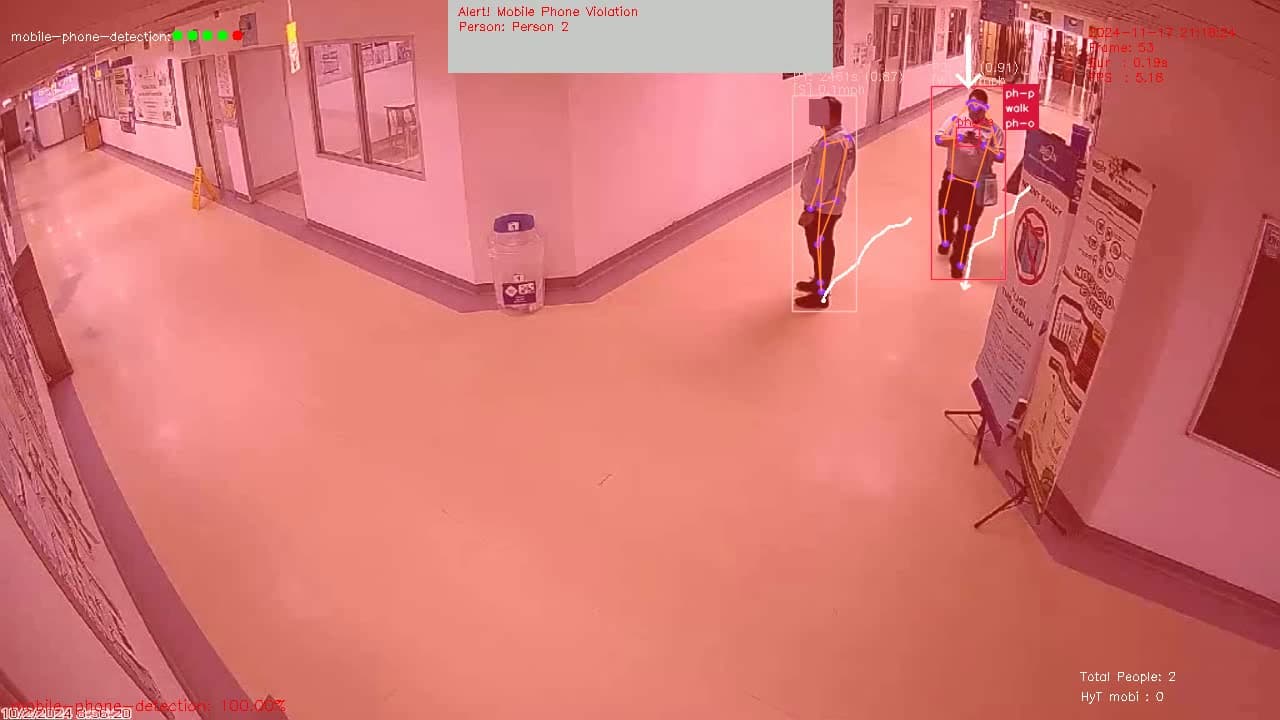
Phone Violation While Walking
AI detects mobile phone usage while walking in an office area
Example Videos
Phone Violation While Walking
AI detects mobile phone usage while walking in an office area
Phone Compliance in Manufacturing
Detecting phone usage on the manufacturing floor
Phone Compliance in Walkway
Distracted walking detection in a walkway
Phone Usage on Staircases
Detecting distracted walking on stairs — a high-risk scenario
Phone Usage Near Equipment
Detecting phone usage near heavy equipment and machinery
Phone Usage at Intersections
Detecting distracted walking at blind corners and intersections
The Growing Smartphone Zombie Problem in Workplaces
Walk through any warehouse, manufacturing floor, or construction site and you will spot them: workers heads-down in their phones, oblivious to forklifts, moving equipment, and physical hazards around them. The safety industry calls this the "smartphone zombie" problem, and it is getting worse every year.
The numbers are alarming:
- Pedestrian injuries from phone use have more than doubled since 2004 (AAOS)
- Distracted walking increases accident risk by up to 48% in workplace environments
- Phone use during equipment operation multiplies error rates by 3-6x
- 54% of distracted walkers are under 40 — the core of your active workforce
Traditional approaches — poster campaigns, supervisor walk-throughs, disciplinary policies — have not kept pace. Workers know the rules but reach for their phones out of habit. By the time a supervisor notices, the dangerous moment has already passed. What the industry needs is continuous, real-time detection that can intervene in the moment.
That is where Video Behavior Analytics (VBA) comes in.
What Is Video Behavior Analytics (VBA)?
Video Behavior Analytics is the industry term for AI systems that analyze human behavior patterns from video feeds. Rather than just detecting objects (a person, a phone), VBA understands what people are doing — walking, standing, climbing stairs — and whether those behaviors create safety risks in their specific environment.
For distracted walking prevention, VBA combines three capabilities:
- Phone/device detection — Identifying when a worker is holding and actively using a mobile phone
- Movement analysis — Tracking whether the person is walking, standing, or navigating stairs
- Environmental context — Understanding the zone (production floor vs. break room), proximity to hazards (forklifts, machinery), and applying the appropriate safety rules
This combination is what separates VBA from basic phone detection. A worker checking their phone while standing in a safe area is very different from a worker texting while walking through a forklift zone. VBA understands the difference.
How Distracted Walking Prevention Works
Modern VBA systems like Visionify's mobile phone compliance solution use your existing CCTV cameras to provide continuous monitoring without any new hardware. Here is how the detection pipeline works:
Step 1: Camera Integration
The system connects to your existing IP/CCTV cameras via standard RTSP streams. Most facilities already have cameras covering the exact areas where distracted walking is most dangerous — walkways, stairs, production floors, and intersections.
Step 2: Real-Time Behavior Analysis
The AI processes every camera feed continuously, tracking people and detecting phone usage. When it identifies the combination of phone usage + walking, it classifies the event as distracted walking and assigns a severity level based on:
- Location risk — Staircase > forklift zone > open walkway > break room
- Proximity to hazards — Near moving equipment, edges, or traffic
- Duration — Extended phone usage while walking is flagged higher
- Zone rules — Customizable per area of your facility
Step 3: Immediate Intervention
When a violation is detected, the system can trigger:
- PA announcements — Automated voice warnings near the violation (e.g., "Please put away your phone in this area")
- Visual alerts — Notifications on nearby monitors or light towers
- Supervisor notifications — SMS, WhatsApp, Microsoft Teams, or email alerts with video clips
- Escalation — High-risk violations (stairs, near heavy equipment) get immediate priority alerting
Step 4: Compliance Analytics
Every event is logged with timestamp, zone, duration, and video evidence. The dashboard provides:
- Violation trends by zone, shift, and time of day
- Hotspot maps showing where distracted walking is most common
- Compliance improvement tracking over weeks and months
- Exportable reports for EHS reviews and management presentations
Real-World Use Cases
Distracted Walking on Staircases
Staircase falls are among the most common workplace injuries, and phone usage while navigating stairs dramatically increases the risk. VBA detects the combination of phone usage + stair navigation and triggers immediate audio warnings through nearby speakers. Facilities that implement stairway phone detection typically see a significant reduction in stair-related near-misses within weeks.
Smartphone Zombies in Forklift Zones
Workers walking through active forklift areas while looking at their phones create one of the most dangerous workplace scenarios. The VBA system detects phone usage in designated forklift zones and alerts both the distracted pedestrian (via PA) and the safety team (via mobile notifications). This works in conjunction with forklift near-miss detection for comprehensive pedestrian safety.
Phone Usage on Production Floors
Manufacturing facilities with moving machinery, conveyor belts, and robotic systems cannot afford distracted workers. Zone-based rules prohibit phone usage on the production floor while allowing it in designated break areas and communication zones. The system enforces these rules consistently, 24/7, across every shift.
Phone Compliance in Clean Rooms and Hygiene Zones
In food & beverage and pharmaceutical manufacturing, phone usage creates contamination risks in addition to safety hazards. VBA enforces no-phone policies in clean rooms and hygiene-controlled areas, supporting both safety and quality compliance requirements.
The ROI of Distracted Walking Prevention
The business case for VBA-powered distracted walking prevention is straightforward:
- Average cost of a medically consulted workplace injury: $40,000+
- Average cost of a workplace fatality: $1.39M
- Reduction in phone-related violations after VBA deployment: 60-80% within the first month
- Insurance premium impact: Many carriers offer reduced rates for facilities with active behavioral safety monitoring
Beyond direct cost savings, distracted walking prevention demonstrates proactive safety leadership — exactly what OSHA inspectors, insurance auditors, and corporate safety teams want to see.
Getting Started
Implementing distracted walking prevention with Visionify is straightforward:
- Connect existing cameras — No new hardware needed in most cases
- Define zone rules — Configure which areas prohibit phones, which allow static use, and which are fully permitted
- Set alert channels — Choose how violations are communicated (PA, SMS, Teams, email)
- Start in monitoring mode — Establish a baseline before enabling active intervention
- Go live — Typically within one week of starting deployment
The system works alongside other Visionify safety scenarios — PPE compliance, forklift safety, slip and fall detection — on the same camera infrastructure, providing a comprehensive safety monitoring platform.
Key Takeaways
- Distracted walking from phone usage is a growing, measurable workplace safety risk that traditional approaches cannot address at scale
- Video Behavior Analytics (VBA) is the industry-standard approach for detecting and preventing unsafe phone behaviors using existing cameras
- Context-aware detection distinguishes between safe phone usage (break room, standing) and dangerous phone usage (stairs, forklift zones, walking)
- Real-time intervention through PA systems and supervisor alerts corrects behavior in the moment, not after an incident
- Compliance analytics provide the data EHS teams need to demonstrate safety improvement and justify continued investment
The smartphone zombie problem is not going away on its own. The question is whether your facility will address it proactively with AI-powered monitoring, or reactively after an incident occurs.
Ready to see how Visionify's distracted walking prevention works in your facility? Schedule a demo to see Video Behavior Analytics in action.
Frequently Asked Questions
Find answers to common questions about this topic
Want to learn more?
Discover how our Vision AI safety solutions can transform your workplace safety.
Book a DemoSchedule a Meeting
Book a personalized demo with our product specialists to see how our AI safety solutions can work for your business.
Choose a convenient time
Select from available slots in your timezone
30-minute consultation
Brief but comprehensive overview of our solutions
Meet our product experts
Get answers to your specific questions